
为什么需要工具
只有"生成文本"这种纸上谈兵的能力,是构建不了强大 AI 应用的。工具是赋予大语言模型与外部世界交互能力的关键组件——借助它,模型才能执行搜索、计算、数据库查询、发邮件、调第三方 API 等。
有了工具,大模型才能从"认识世界"走向"改变世界"。
工具是构建智能体的核心要素之一(还记得那个公式吗:`Agent = LLM + Planning + Tools + Memory + Action)。
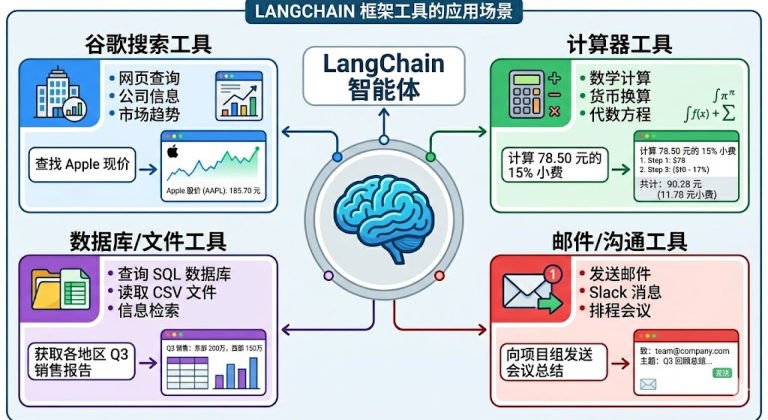 图:LangChain 框架里工具的典型应用场景——搜索、计算器、数据库/文件、邮件/沟通
工具调用 = 函数调用
在 LangChain 中,工具(Tools)实际上是指明确定义了输入和输出的可调用函数。因此"工具调用(Tool Calling)"也被称为"函数调用(Function Calling)"。
两种调用方式:
| 方式 | 用法 | 适合 |
|---|---|---|
| 直接调用 | get_weather.invoke({"city": "北京"}) | 测试、单元验证 |
| 模型绑定调用 | model.bind_tools([...]) 后由模型决定何时调、传什么参数 | 真正的智能体 |
工具调用的整体流程
用户提问
   ↓
模型结合上下文判断:要不要调工具?调哪个?参数是什么?
   ↓
应用执行工具(真正去查天气、查数据库、发邮件…)
   ↓
把工具结果回传给模型
   ↓
模型基于结果生成最终回复大模型能根据对话上下文决定何时调用工具以及传递哪些参数——这也是它比"硬编码 if-else"强的地方。我们写的 LangChain 应用,对应的就是图里的"AI 助手/应用"那一环。
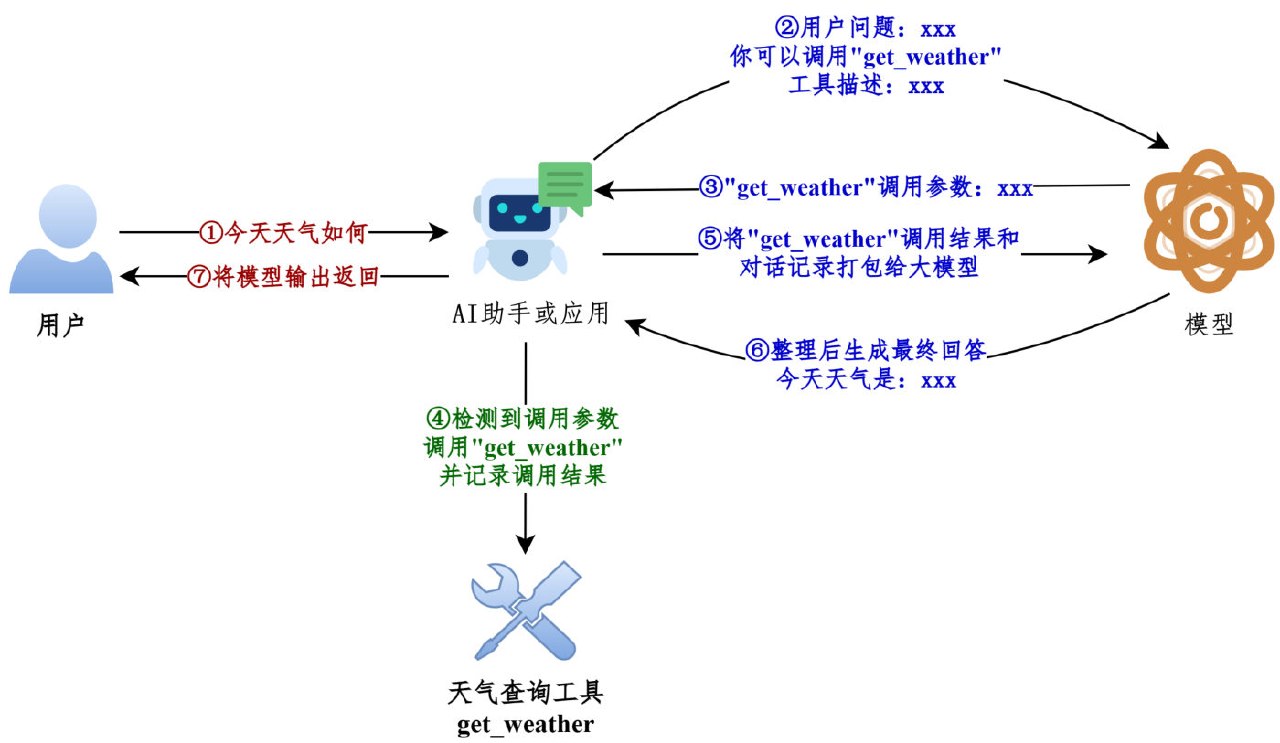 图:工具调用的经典流程——用户提问、模型要工具、应用执行、结果回传、模型生成最终回复
从 Message 流转看
# 1. 绑定工具(模型 + 工具列表 → 带工具能力的模型)
model_with_tools = model.bind_tools([get_weather])

messages = [HumanMessage("今天北京天气如何")]

# 2. 第一次调用:模型不直接回答,而是"要求调用工具"
response = model_with_tools.invoke(messages)
print(response.tool_calls)
# [{'name': 'get_weather', 'args': {'city': '北京'}, 'id': 'call_xxx'}]

# 3. 把这条 AI 消息追加进历史
messages.append(response)

# 4. 应用执行工具,把结果包成 ToolMessage(tool_call_id 必须对应)
tool_result = get_weather.invoke(response.tool_calls[0]["args"])
messages.append(ToolMessage(content=tool_result, tool_call_id=response.tool_calls[0]["id"]))

# 5. 再调一次模型:这次它拿着工具结果生成最终回复
final = model_with_tools.invoke(messages)
print(final.content)
IMPORTANT
关键点:模型自己不执行工具。它只是"提出调用请求(tool_calls)",真正执行的是你的代码,执行完再以 ToolMessage 回传——这个"请求→执行→回传"的循环,就是智能体的最小骨架。
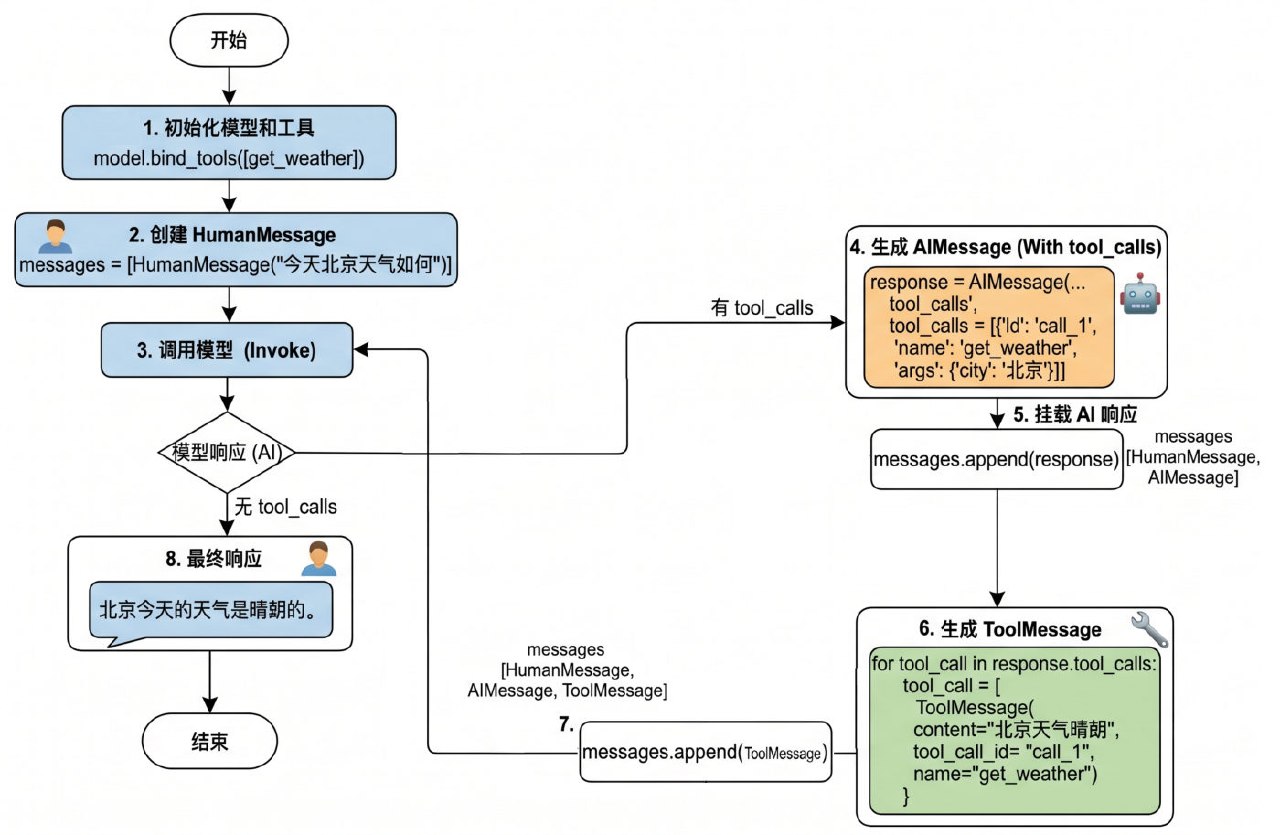 图:完整的四步调用流程图——有 tool_calls 就挂载 AI 响应、生成 ToolMessage、回传后再调模型
定义方式一:不用 @tool
直接把普通函数放进 bind_tools(),LangChain 会在内部把它转成工具描述(convert_to_openai_tool):
def get_weather(city: str):
    """获取天气的工具"""
    return f"{city}天气晴朗"

model_with_tools = model.bind_tools([get_weather])
convert_to_openai_tool(get_weather) 的输出包含 type 和 function 两部分——这就是最终发给模型的"工具说明书"。
输出结构详解
执行 model.bind_tools([get_weather]) 时,底层最终会调用 convert_to_openai_tool 生成工具描述,所以我们可以直接调它,看看"工具说明书"到底长什么样:
from langchain_core.utils.function_calling import convert_to_openai_tool
from rich import print as rprint

def get_weather(city: str):
    return f"{city}天气晴朗"

rprint(convert_to_openai_tool(get_weather))输出(这个函数没写 docstring,所以 description 是空字符串):
{
    "type": "function",
    "function": {
        "name": "get_weather",
        "description": "",
        "parameters": {
            "properties": {
                "city": {
                    "type": "string"
                }
            },
            "required": ["city"],
            "type": "object"
        }
    }
}
三个关键字段的含义:
| 字段 | 含义 |
|---|---|
type | 定义当前数据节点必须是什么数据类型。常见类型:string、number、integer、boolean、object、array、null(object 就是 JSON 对象) |
properties | 定义 JSON 对象(Object)里可以包含哪些属性(键),以及每个属性对应的值类型和说明 |
required | 当 type 为 "object" 时使用,是个数组,列出对象中必须存在的属性名 |
NOTE
为什么没加 @tool 的函数也能当工具用? 看 convert_to_openai_tool 底层源码:
elif isinstance(function, langchain_core.tools.base.BaseTool):
    oai_function = cast("dict", _format_tool_to_openai_function(function))
elif callable(function):
    oai_function = cast("dict", _convert_python_function_to_openai_function(function))
加了 @tool 的函数走上面那条分支(本身就是 BaseTool,直接格式化);没加的走下面那条——后者会基于函数定义和 docstring 生成 Pydantic 模式的描述,再转成规范的 tool_schema。这就是"普通函数也能当工具"的机制。
实测(本机 langchain-core 1.2.18):convert_to_openai_tool 现在会再委派一层给 convert_to_openai_function,但分支结构完全一致(先判 BaseTool,再判 callable),课程讲的原理没有过时。
Google 风格 docstring 规范
convert_to_openai_tool 会从 docstring 加载参数说明,而这里的 docstring 必须遵循 Google 风格:
| 参考 | 链接 |
|---|---|
| Google 风格 docstring 说明 | <https://google.github.io/styleguide/pyguide.html> |
| Google 风格 docstring 示例 | <https://www.sphinx-doc.org/en/master/usage/extensions/example_google.html> |
| Python docstring 通用约定(PEP 257) | <https://peps.python.org/pep-0257/> |
基础用法不必完整阅读规范,按示例仿写即可——用 Args:、Returns:、Raises: 等关键字:
from langchain_core.utils.function_calling import convert_to_openai_tool
from rich import print as rprint

def get_weather(city: str):
    """
    天气查询工具

    Args:
        city: 城市名称
    """
    return f"{city}天气晴朗"

rprint(convert_to_openai_tool(get_weather))输出——city 的 description 被自动填上了:
{
    "type": "function",
    "function": {
        "name": "get_weather",
        "description": "天气查询工具",
        "parameters": {
            "properties": {
                "city": {
                    "description": "城市名称",
                    "type": "string"
                }
            },
            "required": ["city"],
            "type": "object"
        }
    }
}
Agent 通过工具的这些注释来理解工具的用途和调用时机,因此清晰、准确的文档字符串是工具能被正确调用的前提。写好写坏差别很大:
# ❌ 不好:太模糊
@tool
def tool1(x: str) -> str:
    """做一些事情"""
    ...

# ✅ 好:清晰明确
@tool
def search_products(query: str) -> str:
    """
    在产品数据库中搜索产品

    Args:
        query: 搜索关键词,如"笔记本电脑"、"手机"

    Returns:
        产品列表的 JSON 字符串
    """
    ...
参数类型从哪里来
参数类型来源于函数的类型注解。把注解删掉,parameters 里就只剩一个空对象:
def get_weather(city):        # ← 注解没了
    """
    天气查询工具
    """
    return f"{city}天气晴朗"

convert_to_openai_tool(get_weather){
"type": "function",
"function": {
"name": "get_weather",
"description": "天气查询工具",
"parameters": {
"properties": {
"city": {} # ← 没有 type、没有 description,模型只能猜
},
"required": ["city"],
"type": "object"
}
}
}WARNING
删了注解只是"参数类型丢失",但下面这个会直接报错:docstring 里写了参数说明、函数签名却没有对应参数时——
def get_weather(city):
    """
    天气查询工具

    Args:
        city: 城市名称
    """
...ValueError: Arg city in docstring not found in function signature.规矩很简单:docstring 的 Args: 里写了哪个参数,签名里就必须有这个名字(而且要带类型注解)。 两者必须一一对应。
参数默认值会变成 default 字段
有默认值的参数:描述信息里会包含 default 字段,并且不会出现在 required 列表中;没默认值的参数照旧进 required。
def get_weather(city: str = "北京"):      # ← 有默认值
    """
    天气查询工具

    Args:
        city: 城市名称
    """
return f"{city}天气晴朗"{
"type": "function",
"function": {
"name": "get_weather",
"description": "天气查询工具",
"parameters": {
"properties": {
"city": {
"default": "北京", # ← 多出 default
"description": "城市名称",
"type": "string"
}
},
"type": "object" # ← required 整段消失了
}
}
}只有一个参数且它有默认值时,required 字段被整个移除。部分参数有默认值时,required 里只留没默认值的那个:
def get_weather(dt: str, city: str = "北京"):
    """
    天气查询工具

    Args:
        dt: 日期
        city: 城市名称
    """
return f"{city}天气晴朗""required": ["dt"] # ← 只有没默认值的 dt 留在这里TIP
想少让模型填参数,就在签名里给默认值——模型看不到 required,就不会硬编一个值出来。这也是"参数可选"最省事的表达方式(比在 description 里写"这个参数可以不填"可靠得多)。
定义方式二:@tool 装饰器(推荐)
用 @tool 装饰器修饰,可以自动把普通 Python 函数转化为智能体可调用的工具。这是最直接、代码量最少的方式。
from langchain.tools import tool

@tool
def get_weather(city: str) -> str:
    """获取指定城市的天气信息

    参数:
        city: 城市名称,如"北京"、"上海"

    返回:
        天气信息字符串
    """
    return f"{city}天气晴朗"
@tool 会从 docstring 生成工具描述,所以必须遵循 Google docstring 规范。没有 docstring 会直接报错:
ValueError: Function must have a docstring if description not provided.docstring 为什么这么重要
模型只能通过 description 判断"这个工具是干什么的、什么时候该用"。写得含糊,模型就选错工具或该调不调。所以:
| 要素 | 说明 |
|---|---|
| 一句话功能说明 | 说清"做什么",最好说清"什么时候用" |
| 参数说明 | 每个参数的含义、格式、取值范围 |
| 返回值说明 | 返回什么,方便模型解读结果 |
工具对象的属性(核对过真实行为)
print(get_weather.name)         # get_weather(默认取函数名)
print(get_weather.description)  # 从 docstring 提取
print(get_weather.args)         # {'city': {'title': 'City', 'type': 'string'}}
print(get_weather.invoke({"city": "北京"})) # 北京天气晴朗- 改名字:
@tool("查天气")或@tool(name_or_callable="查天气") - 参数类型注解(
city: str)、默认值都会被转成 JSON Schema 的一部分,告诉模型"该传什么"
自定义工具描述:description
@tool 生成描述时有三种情况,正好对应"不写 / 写整段 / 拆开解析":
情况1:只给 docstring——bind_tools() 调用时,先把函数封装成 BaseTool 对象,再交给 convert_to_openai_tool 生成描述;@tool 会从 docstring 生成描述,同样必须遵循 Google docstring 规范。没有 docstring 就直接报错:
ValueError: Function must have a docstring if description not provided.情况2:@tool(description="...") 覆盖 docstring——description 的优先级高于 docstring 的函数说明:
@tool(description="根据城市名称查询当日天气的工具")
def get_weather(city: str):
    """
    天气查询工具
    """
    return f"{city}天气晴朗"

convert_to_openai_tool(get_weather)"description": "根据城市名称查询当日天气的工具" # ← 用的是 description,不是 docstringTIP
什么时候用 description 而不是 docstring?当描述需要带动态信息时(比如从配置读出来的"当前环境:生产"),docstring 是静态字符串,description= 可以拼变量。
情况3:parse_docstring=True 解析 docstring——默认情况下 @tool 会把 docstring 整体当作 description(连 Args: 那几行一起,整段塞进去):
@tool
def get_weather(city: str, units: str = "celsius", include_forecast: bool = False) -> str:
    """
    获取当日天气,可选择是否同时查询未来五日天气预报

    Args:
        city: 城市
        units: 气温单位,可选:celsius-摄氏度,fahrenheit-华氏度
        include_forecast: 是否包含未来五日的天气预报
    """
    ...
description 变成一整坨('获取当日天气,可选择是否同时查询未来五日天气预报\n\nArgs:\n city: 城市\n units: ...'),而 city 的 description 是空的。
加上 parse_docstring=True,docstring 才会被解析、填充到各个字段的 description 里:
@tool(parse_docstring=True)
def get_weather(city: str, units: str = "celsius", include_forecast: bool = False) -> str:
    """
    获取当日天气,可选择是否同时查询未来五日天气预报

    Args:
        city: 城市
        units: 气温单位,可选:celsius-摄氏度,fahrenheit-华氏度
        include_forecast: 是否包含未来五日的天气预报
    """
...{
"name": "get_weather",
"description": "获取当日天气,可选择是否同时查询未来五日天气预报",
"parameters": {
"properties": {
"city": {"description": "城市", "type": "string"},
"units": {"default": "celsius", "description": "气温单位,可选:celsius-摄氏度,fahrenheit-华氏度", "type": "string"},
"include_forecast": {"default": false, "description": "是否包含未来五日的天气预报", "type": "boolean"}
},
"required": ["city"],
"type": "object"
}
}description 只剩一句话,参数说明各就各位——这才是我们要的形态。
WARNING
parse_docstring=True 是把 docstring 当"格式约定"来解释的,格式不对会直接抛异常:
ValueError: Found invalid Google-Style docstring.对比一下:不用 @tool 时,不合法的 docstring 会被当成普通文本当作 description(不报错);用了 @tool + parse_docstring=True,就会抛异常。(反例:Args: 和参数说明写在同一行、或 Args: 后面直接跟冒号换行——都不是合法 Google 风格。) 实测(本机 langchain-core 1.2.18):默认不带 parse_docstring 时 description 是整段 docstring、参数无 description;加 parse_docstring=True 后参数描述正确填充——与课程一致。另外课程输出里 include_forecast 的 default 显示成字符串 'False',本机实际是布尔 false(以实际为准)。
保留字提醒
不要用 config 或 runtime 作为参数名,这些是 LangChain 内部保留的。
WARNING
课程只是提醒,这里给个实测证据(本机 langchain-core 1.2.18)——用 config 当参数名,工具的 args / schema 生成都正常,但在调用时必崩:
@tool
def bad_tool(config: str) -> str:
    """测试保留字"""
    return config

print(bad_tool.args)                       # {'config': {'title': 'Config', 'type': 'string'}}  ← 看起来没问题
bad_tool.invoke({"config": "x"})
# TypeError: bad_tool() missing 1 required positional argument: 'config'
原因是 config 会被 LangChain 的调用机制截走当运行时配置,根本传不到函数体里。invoke({"name": ..., "args": {"config": ...}}) 这种 tool_call 形式同样报错;换成 runtime 在本版能跑通,但按课程建议一律避开这两个名字。
此外,开发中习惯使用函数名作为工具名称,不推荐自定义工具名称(工具名要和函数名保持一致,便于排查)。
用 Pydantic 定义参数结构:args_schema
参数多、需要校验时,用 Pydantic 模型定义 args_schema:
from pydantic import BaseModel, Field
from langchain.tools import tool

class WeatherArgs(BaseModel):
    city: str = Field(description="城市名称,如北京")
    unit: str = Field(default="celsius", description="温度单位:celsius 或 fahrenheit")

@tool(args_schema=WeatherArgs)
def get_weather(city: str, unit: str = "celsius") -> str:
    """获取指定城市的天气信息"""
    return f"{city} 的天气:25 ({unit})"
TIP
用 Pydantic 的好处:类型安全 + 参数校验。模型传参前,Pydantic 会先验证类型与有效性,参数写错能立刻发现,而不是让模型拿到一个莫名的报错。
Pydantic 的三件套:BaseModel / Field / Literal
当工具参数需要枚举值、范围限制或更复杂的业务逻辑验证时,Pydantic 是理想选择——它能精确控制参数的格式和验证规则,让大模型更准确地理解怎么调工具。
① BaseModel 基类:继承它来声明字段结构、类型约束、默认值和校验规则。
from pydantic import BaseModel

class WeatherInput(BaseModel):
    city: str

print(WeatherInput(city="北京"))      # city='北京'
WARNING
BaseModel 子类初始化时不接收位置参数,字段值必须用关键字参数传:
WeatherInput("北京")
# TypeError: BaseModel.__init__() takes 1 positional argument but 2 were given原因看它的签名就明白了——def __init__(self, /, **data: Any) -> None:所有关键字参数被收集进字典 data,再按类型注解校验,失败就抛异常。所以"必须写字段名"不是风格问题,是签名决定的。
② Field():用来定制字段——设置默认值、描述等。
from pydantic import BaseModel, Field

class WeatherInput(BaseModel):
    city: str = Field(default="北京")            # 举例1:设置默认值
    include_forecast: bool = Field(
        default=False,
        description="是否包含未来五日天气预报",   # 举例2:设置描述
    )

print(WeatherInput())      # city='北京' include_forecast=False
IMPORTANT
每个字段的 description 参数至关重要——它直接影响大模型理解参数含义的能力。 这是"给模型看的文档",别省。
③ Literal:限定参数只能是几个固定字面量之一。
from pydantic import BaseModel
from typing import Literal

class WeatherInput(BaseModel):
    city: str
    unit: Literal["celsius", "fahrenheit"]

print(WeatherInput(city="北京", unit="celsius")) # city='北京' unit='celsius'传了不在列表里的值,在本地就被 Pydantic 拦下:
WeatherInput(city="北京", unit="kelvin")ValidationError
1 validation error for WeatherInput
unit
Input should be 'celsius' or 'fahrenheit' [type=literal_error, input_value='kelvin', input_type=str]配 Field 一起用(既限定取值、又有默认值和描述):
class WeatherInput(BaseModel):
    city: str = Field(default="北京", description="城市")
    unit: Literal["celsius", "fahrenheit"] = Field(default="celsius", description="气温单位")
include_forecast: bool = Field(default=False, description="是否包含未来五日天气预报")把它接到工具上——@tool(args_schema=PydanticModelCls) 把 Pydantic 模型与工具函数关联,模型要调工具前,Pydantic 会自动验证参数的类型和有效性:
from pydantic import BaseModel, Field
from typing import Literal
from langchain.tools import tool
from langchain_core.utils.function_calling import convert_to_openai_tool

class WeatherInput(BaseModel):
    city: str = Field(default="北京", description="城市")
    unit: Literal["celsius", "fahrenheit"] = Field(default="celsius", description="气温单位")
    include_forecast: bool = Field(default=False, description="是否包含未来五日天气预报")

@tool(args_schema=WeatherInput)
def get_weather(city: str, unit: str = "celsius", include_forecast: bool = False) -> str:
    """获取当日天气,可选未来五日天气预报"""
    temp = 22 if unit == "celsius" else 72
    result = f'{city}当天气温: {temp} {"摄氏度" if unit == "celsius" else "华氏度"}'
    if include_forecast:
        result += "\n未来五天都是晴天"
    return result

convert_to_openai_tool(get_weather)
生成的 schema 里,unit 多出了 enum 数组(这就是 Literal 的价值——把"只能填这几个值"直接告诉模型):
{
    "name": "get_weather",
    "description": "获取当日天气,可选未来五日天气预报",
    "parameters": {
        "properties": {
            "city": {"default": "北京", "description": "城市", "type": "string"},
            "unit": {
                "default": "celsius",
                "description": "气温单位",
                "enum": ["celsius", "fahrenheit"],
                "type": "string"
            },
            "include_forecast": {"default": false, "description": "是否包含未来五日天气预报", "type": "boolean"}
        },
        "type": "object"        # ← 三个参数都有默认值 → 没有 required
    }
}
NOTE
注意这个分工:args_schema 决定了发给模型的 schema(参数名、描述、enum、default 都来自 Pydantic 模型),而函数签名决定实际执行时收什么。所以两边要对得上(上面的 city / unit / include_forecast 一一对应)。
用 JSON Schema 字典定义 args_schema
除了 Pydantic,LangChain 还支持直接用 JSON Schema 字典定义参数模式。极大灵活性是本方式的核心卖点:参数模式可以基于数据库配置或用户输入在运行时动态生成——结构随时可变的场景,这种方式最合适。
完整的工具描述长这样(type + function 两层):
{
    "type": "function",
    "function": {
        "name": "get_weather",
        "description": "获取当日天气,可选未来五日天气预报",
        "parameters": {
            "type": "object",
            "properties": {
                "location": {"type": "string"},
                "units": {"type": "string"},
                "include_forecast": {"type": "boolean"}
            },
            "required": ["location", "units", "include_forecast"]
        }
    }
}
但传给 args_schema 的只有 parameters 那一段:
{
    "type": "object",
    "properties": {
        "location": {"type": "string"},
        "units": {"type": "string"},
        "include_forecast": {"type": "boolean"}
    },
    "required": ["location", "units", "include_forecast"]
}from langchain.tools import tool
from langchain_core.utils.function_calling import convert_to_openai_tool
weather_schema = {
"type": "object",
"properties": {
"location": {"type": "string"},
"units": {"type": "string"},
"include_forecast": {"type": "boolean"}
},
"required": ["location", "units", "include_forecast"]
}
@tool(args_schema=weather_schema)
def get_weather(city: str, unit: str = "celsius", include_forecast: bool = False) -> str:
"""获取当日天气,可选未来五日天气预报"""
return "x"
print(convert_to_openai_tool(get_weather))输出的 parameters 原样就是你给的那份字典(连字段顺序都保持),description 仍取自 docstring。
WARNING
这个方式有个"看着能用,一调就崩"的坑——实测(本机 langchain-core 1.2.18): 裸 JSON Schema 不会被翻译、也不做交叉校验,它原样发给模型;但工具执行时用的是函数签名。上面这段代码里 schema 写的是 location / units,函数签名写的却是 city / unit——模型老老实实按 schema 传 {"location": ..., "units": ...},结果:
TypeError: get_weather() got an unexpected keyword argument 'location'另外多传 schema 里没有的键,也会被 Python 签名拦下(TypeError: ... unexpected keyword argument 'extra')。 结论:用 JSON Schema 当 args_schema 时,字典里的键必须和函数参数名严格一致——把函数签名改成 def get_weather(location: str, units: str = "celsius") 就正常了。课程示例里两者不一致,属于"能生成 schema 但不能真正调用",抄的时候记得改。
相关
练习题
一、知识回顾(读完直接做下面的实践题)
- 工具是赋予大模型与外部世界交互能力的关键组件,让模型从"认识世界"走向"改变世界";它也是智能体的核心要素之一(公式:Agent = LLM + Planning + Tools + Memory + Action)
- 在 LangChain 里,工具就是"明确定义了输入和输出的可调用函数",所以工具调用也叫函数调用(Function Calling);两种调用方式是直接调用(测试、单元验证用)与模型绑定调用(由模型决定何时调、传什么参数)
- 完整流程:用户提问 → 模型判断要不要调、调哪个、参数是什么 → 应用(你的代码)执行工具 → 把结果回传给模型 → 模型生成最终回复;模型自己不执行工具,这个"请求 → 执行 → 回传"的循环就是智能体的最小骨架
- 定义方式一不用装饰器:把普通函数直接传给
bind_tools,底层会用convert_to_openai_tool生成"工具说明书";有装饰器的函数本身就是BaseTool对象(直接格式化),普通函数则基于函数定义和 docstring 生成 Pydantic 模式再转换——这就是"普通函数也能当工具"的机制 - 工具描述是
type+function两层;parameters里的三个关键字段:type定义当前节点的数据类型(常见 string、number、integer、boolean、object、array、null)、properties定义对象里可以有哪些属性、required在type为"object"时列出必须存在的属性 - docstring 必须遵循 Google 风格(用 Args:、Returns、Raises: 这类关键字);参数的类型来自函数的类型注解;把它删掉后
properties里只剩一个空对象({});若 Args: 里写了签名里没有的参数,会抛 ValueError(Arg xxx in docstring not found in function signature) - 参数默认值会变成 schema 里的 default 字段,并且不会出现在 required 列表里;只有一个参数且有默认值时,
required整段消失;想让模型少填参数,就在签名里给默认值 - 用装饰器定义工具时,描述来自 docstring(没有它会直接报 ValueError);工具对象的三个属性是 name、description、args;想改名字用
@tool("查天气"),但开发习惯是工具名与函数名保持一致,便于排查 - 描述有三种给法:只给 docstring、用 description 参数覆盖 docstring(优先级更高,还能拼动态信息)、加
parse_docstring=True让 docstring 里的参数说明"各就各位"(格式不合法会抛 ValueError(Found invalid Google-Style docstring);而不用装饰器时不合法的 docstring 只会被当成普通文本,不报错) - 参数结构用 Pydantic 定义:
BaseModel声明字段结构(子类初始化不接收位置参数,字段值必须写字段名)、Field设置默认值与描述(每个字段的描述是"给模型看的文档")、Literal限定只能取几个固定值(schema 里变成 enum 数组,传错值在本地就抛 ValidationError);也可以用 JSON Schema 字典定义,但字典的键必须和函数参数名严格一致;另外不要用 config / runtime 当参数名
二、裸写题
- 提示(先自己想,实在想不出再点开)
一级 · 思路:先定义、再观察属性、最后看转换出来的结构——它是
type+function两层 二级 · 方法:@tool;add.name/add.description/add.args;add.invoke({"a": 1, "b": 2});convert_to_openai_tool(add)三级 · 骨架:parameters里的properties就是参数模式、required就是必填清单- 提示(先自己想,实在想不出再点开)
一级 · 思路:类型来自注解、默认值来自函数签名、描述来自 docstring;写得对不上就直接报错 二级 · 方法:
@tool(description="...")覆盖、@tool(parse_docstring=True)解析;报错信息是ValueError: Arg xxx in docstring not found in function signature.三级 · 骨架:三次对比convert_to_openai_tool(...)["function"]["parameters"]的输出;打开解析开关后,参数说明才会出现在每个参数的description里- 提示(先自己想,实在想不出再点开)
一级 · 思路:模型不会自己执行工具,它只"申请";真正执行的是你的代码,执行完再回传 二级 · 方法:
model.bind_tools([get_weather])、response.tool_calls、ToolMessage(content=..., tool_call_id=...)三级 · 骨架:call = response.tool_calls[0]→result = get_weather.invoke(call["args"])→tool_call_id=call["id"]- 提示(先自己想,实在想不出再点开)
一级 · 思路:Pydantic 负责"给模型看的 schema + 本地校验";字典方式更灵活,但它不做交叉校验 二级 · 方法:
class WeatherInput(BaseModel)+Field(default=..., description=...)+Literal["celsius", "fahrenheit"];@tool(args_schema=...)三级 · 骨架:传错取值会抛ValidationError(literal_error);字典键对不上签名时会TypeError: ... unexpected keyword argument——字典的键必须和函数参数名严格一致
- 参考答案(做完再点开)
import os
import json
from typing import Literal

from dotenv import load_dotenv
from langchain.chat_models import init_chat_model
from langchain.tools import tool
from langchain_core.messages import HumanMessage, ToolMessage
from langchain_core.utils.function_calling import convert_to_openai_tool
from pydantic import BaseModel, Field, ValidationError

load_dotenv(override=True)

model = init_chat_model(
    model="deepseek-v4-flash",
    model_provider="openai",
    base_url=os.getenv("DEEPSEEK_BASE_URL"),
    api_key=os.getenv("DEEPSEEK_API_KEY"),
)

# ========== 2-1 写一个工具,看看它的"说明书" ==========
@tool
def add(a: int, b: int) -> int:
    """把两个整数相加

    Args:
        a: 第一个整数
        b: 第二个整数

    Returns:
        两数之和
    """
    return a + b

print(add.name, "|", add.description.split("\n")[0], "|", add.args)
print("直接调用:", add.invoke({"a": 1, "b": 2}))

spec = convert_to_openai_tool(add)
print(json.dumps(spec, ensure_ascii=False, indent=2))
# parameters.properties = 参数模式;parameters.required = 必填清单
print("参数模式:", list(spec["function"]["parameters"]["properties"]))
print("必填清单:", spec["function"]["parameters"]["required"])

# ========== 2-2 参数的说明和类型都从哪来 ==========
# ① 默认值参数:schema 里多出 default,required 整段消失
@tool
def get_weather_a(city: str = "北京") -> str:
    """
    天气查询工具

    Args:
        city: 城市名称
    """
    return f"{city}天气晴朗"

spec_a = convert_to_openai_tool(get_weather_a)
print("\n默认值参数:", spec_a["function"]["parameters"])
print("有 required 吗:", "required" in spec_a["function"]["parameters"])     # False

# ② 删掉类型注解 -> properties 里只剩空对象
@tool
def get_weather_b(city) -> str:
    """
    天气查询工具
    """
    return f"{city}天气晴朗"

print("没有注解:", convert_to_openai_tool(get_weather_b)["function"]["parameters"])
# {'properties': {'city': {}}, 'required': ['city'], 'type': 'object'}

# ③ docstring 与签名对不上 -> 定义时就报错
try:
    @tool(parse_docstring=True)
    def get_weather_c(city: str) -> str:
        """
        天气查询工具

        Args:
            city: 城市名称
            city2: 签名里根本没有这个参数
        """
        return f"{city}天气晴朗"
except ValueError as e:
    print("定义时报错:", e)      # Arg city2 in docstring not found in function signature.

# ④ 用装饰器参数覆盖 docstring
@tool(description="根据城市名称查询当日天气的工具")
def get_weather_d(city: str) -> str:
    """
    天气查询工具(这段说明会被覆盖掉)
    """
    return f"{city}天气晴朗"

print("最终 description:", convert_to_openai_tool(get_weather_d)["function"]["description"])

# ④ 打开解析开关,参数说明才会各就各位
@tool(parse_docstring=True)
def get_weather_e(city: str, units: str = "celsius", include_forecast: bool = False) -> str:
    """
    获取当日天气,可选择是否同时查询未来五日天气预报

    Args:
        city: 城市
        units: 气温单位,可选:celsius-摄氏度,fahrenheit-华氏度
        include_forecast: 是否包含未来五日的天气预报
    """
    return "x"

print("解析后的参数:", json.dumps(
    convert_to_openai_tool(get_weather_e)["function"]["parameters"], ensure_ascii=False))

# ========== 2-3 绑定工具:请求 -> 执行 -> 回传 ==========
@tool
def get_weather(city: str) -> str:
    """获取指定城市的天气信息

    Args:
        city: 城市名称,如"北京"
    """
    return f"{city}天气晴朗,25℃"

model_with_tools = model.bind_tools([get_weather])
messages = [HumanMessage("今天北京天气如何")]

response = model_with_tools.invoke(messages)          # 第一次调用:模型只"申请"调工具
print("\n模型要求调用:", response.tool_calls)

if response.tool_calls:
    messages.append(response)                          # 1) 先追加 AI 消息
    call = response.tool_calls[0]
    result = get_weather.invoke(call["args"])          # 2) 执行工具
    messages.append(ToolMessage(content=result, tool_call_id=call["id"]))   # 3) 回传结果
    final = model_with_tools.invoke(messages)          # 4) 再调一次
    print("最终回复:", final.content)

# ========== 2-4 Pydantic 与 JSON Schema 两种参数结构 ==========
class WeatherInput(BaseModel):
    city: str = Field(default="北京", description="城市")
    unit: Literal["celsius", "fahrenheit"] = Field(default="celsius", description="气温单位")
    include_forecast: bool = Field(default=False, description="是否包含未来五日天气预报")

@tool(args_schema=WeatherInput)
def get_weather_v2(city: str, unit: str = "celsius", include_forecast: bool = False) -> str:
    """获取当日天气,可选未来五日天气预报"""
    temp = 22 if unit == "celsius" else 72
    result = f"{city}当天气温: {temp} {'摄氏度' if unit == 'celsius' else '华氏度'}"
    if include_forecast:
        result += "\n未来五天都是晴天"
    return result

params = convert_to_openai_tool(get_weather_v2)["function"]["parameters"]
print("\nPydantic 版参数:", json.dumps(params, ensure_ascii=False))
print("unit 的取值限制:", params["properties"]["unit"].get("enum"))    # ['celsius', 'fahrenheit']
print("有 required 吗:", "required" in params)                        # False(三个参数都有默认值)
print("实际调用:", get_weather_v2.invoke({"city": "上海", "unit": "fahrenheit"}))

try:
    WeatherInput(city="北京", unit="kelvin")           # 本地就被拦下
except ValidationError as e:
    print("传了范围外的值 ->", e.errors()[0]["type"], "|", e.errors()[0]["msg"])

try:
    WeatherInput("北京")                              # 位置参数不被接受
except TypeError as e:
    print("位置参数 ->", e)

# 直接用 JSON Schema 字典:只有 parameters 那一段
weather_schema = {
    "type": "object",
    "properties": {
        "location": {"type": "string"},
        "units": {"type": "string"},
        "include_forecast": {"type": "boolean"},
    },
    "required": ["location", "units", "include_forecast"],
}

@tool(args_schema=weather_schema)
def get_weather_v3(city: str, unit: str = "celsius", include_forecast: bool = False) -> str:
    """获取当日天气,可选未来五日天气预报"""
    return f"{city} {unit} {include_forecast}"

print("字典版参数(原样输出):", json.dumps(
    convert_to_openai_tool(get_weather_v3)["function"]["parameters"], ensure_ascii=False))

try:
    # 模型会老老实实按 schema 传参 -> 被 Python 签名拦下
    get_weather_v3.invoke({"location": "杭州", "units": "celsius", "include_forecast": False})
except TypeError as e:
    print("字典键和参数名不一致 ->", e)
# 结论:字典里的键必须和函数参数名严格一致(把签名改成 location / units 才能真的调用)