
第 6 章学过模型的结构化输出(with_structured_output)。Agent 也能做结构化输出,但用法和时机都不一样——这一篇讲清楚区别,以及四种策略怎么选。
模型 vs Agent 的结构化输出
| 维度 | 模型的结构化输出 | Agent 的结构化输出 |
|---|---|---|
| 操作对象 | 大模型对象 | Agent |
| 解析时机 | 每次模型调用生成 AIMessage 时都会解析 | 仅在 Agent 决定"任务结束"并输出最终答案时解析 |
| 数据流转 | 模型 → 结构化对象 | 模型 → 工具 → 反思 → …… → 结构化对象 |
| 绑定方式 | with_structured_output | response_format 参数 |
| 适用场景 | 单次、确定性的任务(提取字段、翻译、分类) | 多步、复杂推理的任务(查文档后汇总报表) |
一句话:模型的结构化输出是"一问一答的格式约束",Agent 的结构化输出是"整段任务结束时的交付格式"。
四种策略
create_agent() 通过 response_format 参数设置期望的输出模式,支持四类取值:
response_format: Union[
    ToolStrategy[StructuredResponseT],
    ProviderStrategy[StructuredResponseT],
    type[StructuredResponseT],     # 直接给类型(自动选择)
    None,
]
模型生成结构化数据后,系统会自动捕获、验证,并把结果存进 Agent 状态的 structured_response 键:
if "structured_response" in result:
    analysis = result["structured_response"]
① ProviderStrategy:用模型厂商的原生能力
"原生结构化输出"指大模型提供商通过 API 直接在响应阶段强制保证输出格式符合规范的能力(比如 OpenAI 的 strict json_schema)。只适用于支持原生结构化输出的模型,如 OpenAI、Anthropic Claude、xAI Grok 等。
from langchain.agents.structured_output import ProviderStrategy
from pydantic import BaseModel, Field

class ContactInfo(BaseModel):
    """个人联系信息"""
    name: str = Field(description="姓名")
    email: str = Field(description="电子邮箱")
    phone: str = Field(description="手机号")

agent = create_agent(model=model, response_format=ProviderStrategy(ContactInfo))
NOTE
实测看看它到底发了什么请求(用假服务端抓包):
- 请求体里没有 tools,而是多了一个
response_format字段:text{'response_format': {'type': 'json_schema', 'json_schema': {'name': 'ContactInfo', 'strict': False, 'schema': {'properties': {'name': {'description': '姓名', ...}}}}}} - 模型按原生 JSON Schema 返回内容(不是工具调用),LangChain 再解析成 Pydantic 对象。
这也解释了为什么它只认支持原生结构化输出的模型:换到不支持的模型上,这个字段会被忽略或报错。
② ToolStrategy:用工具调用实现(推荐)
对于不支持原生结构化输出的模型,LangChain 用"工具调用"的方式实现结构化输出——把 Schema 当成一个工具传给模型,模型"调用"它,参数就是结构化数据。
from langchain.agents.structured_output import ToolStrategy

agent = create_agent(model=model, response_format=ToolStrategy(ContactInfo))
response = agent.invoke({
    "messages": [HumanMessage("从这段话中抽取结构化信息:小明的邮箱地址为:songhk@atguigu.com,手机号:12345678912")]
})
print(response["structured_response"])
# name='小明' email='songhk@atguigu.com' phone='12345678912'
IMPORTANT
ToolStrategy 会往消息列表末尾追加一条"伪 ToolMessage"——让链路完整(模型发了工具调用,总要有工具响应),但实际上没有执行任何工具。
实测一次调用的完整消息流:
HumanMessage    content='从这段话中抽取结构化信息:小明的邮箱 songhk@atguigu.com…'
AIMessage       content=''             ← 发起工具调用(工具名就是 Schema 类名 ContactInfo)
ToolMessage name='ContactInfo' ← 伪消息,内容是 "Returning structured response: name='小明' …"而返回的字典里有两个键:['messages', 'structured_response'],structured_response 就是 Pydantic 对象(type(...) 是 ContactInfo)。
官方推荐用 ToolStrategy:它适用于任何支持工具调用的现代模型,兼容性最好。
③ 直接传类型 / AutoStrategy:自动选择
把类型直接给 response_format,LangChain 会自动包装成 AutoStrategy,自动选择策略:支持原生结构化输出的模型优先用 ProviderStrategy,否则用 ToolStrategy。
agent = create_agent(
    model=model,
    response_format=ContactInfo,     # Auto-selects ProviderStrategy/ToolStrategy
)
print(result["structured_response"])
# name='John Doe' email='john@atguigu.com' phone='(010) 56253825'
WARNING
课程提到:LangChain 1.0 及以上版本不再支持直接传类型,必须显式写 ToolStrategy 或 ProviderStrategy(但经测试 1.2 版本还能用)。 建议:新代码一律显式写策略,别依赖这种"自动"——将来版本收紧时会直接报错。
源码里才看得到的 AutoStrategy
课程强调了一句:这种策略官方没在参数列表或文档里列出来,是读源码才看到的。LangChain 源码里的类型别名长这样:
ResponseFormat = ToolStrategy[SchemaT] | ProviderStrategy[SchemaT] | AutoStrategy[SchemaT]
"""Union type for all supported response format strategies."""也就是说三种策略在源码里是平级的,create_agent 的参数表只是把"直接传类型"(会自动包装成 AutoStrategy)单独写了一种形态。
既然它存在,也可以显式写出来(更明确地表达"我就是要让框架自己挑"):
from langchain.agents.structured_output import AutoStrategy

agent = create_agent(
    model=model,
    response_format=AutoStrategy(ContactInfo),
)

result = agent.invoke({
    "messages": [{"role": "user", "content": "联系人信息: John Doe, john@atguigu.com, (010) 56253825"}]
})
print(result["structured_response"])
# name='John Doe' email='john@atguigu.com' phone='(010) 56253825'
NOTE
AutoStrategy(ContactInfo) 与 response_format=ContactInfo 等价:支持原生结构化输出的模型走 ProviderStrategy,否则走 ToolStrategy。 换句话说,response_format 一共是三种显式写法 + 一个 None:ToolStrategy(...)、ProviderStrategy(...)、AutoStrategy(...)(或直接给类型),以及 None。
④ None(默认)
response_format=None 是默认配置,表示不做结构化输出,Agent 用自然语言回答。
ToolStrategy 详解
class ToolStrategy(Generic[SchemaT]):
    schema: type[SchemaT]                                    # 必需
    tool_message_content: str | None                          # 可选
    handle_errors: Union[bool, str, type[Exception], tuple[type[Exception], ...], Callable[[Exception], str]]   # 可选,默认 True
参数1:schema(支持哪些 Schema)
与模型结构化输出一致,支持 Pydantic 模型、TypedDict、JSON Schema、数据类(@dataclass),另外还支持联合类型 Union[类型1, 类型2]——允许模型根据输入内容选择最匹配的数据结构:
agent = create_agent(
    model=model,
    response_format=ToolStrategy(Union[ContactInfo, EventDetails]),
)
NOTE
TypedDict 当 Schema 的三条要点(第 12 篇实测过它不做运行时校验):
- 字段写成
Annotated[类型, 默认值, "描述"]格式 - 可选字段用
Optional包装,默认值也写在Annotated里 - TypedDict 不支持运行时验证——写错了不会报错,只会悄悄出错
参数2:tool_message_content(自定义伪消息)
既然那条 ToolMessage 是"假的",它的内容就可以自己定:默认用展示输出数据的标准语句(Returning structured response: ...),也可以换成更自然的说法。
agent = create_agent(
    model=model,
    response_format=ToolStrategy(
        ContactInfo,
        tool_message_content="提取完成!",
    ),
)
有什么用?两个场景:
- 在最终用户可见的对话流里,用更自然的消息替代原始数据(不然用户会看到一大串字段)
- 用简短的确认信息替代很长的数据块,减少 token 消耗
TIP
无论 tool_message_content 怎么设,结构化数据最终都会正确存进 result["structured_response"]——自定义消息只影响对话历史里的那一条记录。
参数3:handle_errors(校验失败怎么办)
受限于模型能力,输出可能不符合格式要求。handle_errors 决定这时候怎么办:
| 取值 | 行为 | 适用场景 |
|---|---|---|
True(默认) | 捕获所有异常,用 LangChain 内置的错误消息模板提示模型重试 | 大多数通用场景 |
False | 关闭重试,任何异常直接抛出、中断程序 | 需要自己处理异常 / 调试 |
"自定义字符串" | 捕获所有异常,但把固定字符串当错误消息回给模型 | 需要统一、友好的提示或业务引导 |
ExceptionType | 只捕获指定类型(如 ValueError)的异常并重试,其他直接抛出 | 精准控制,只重试特定错误 |
callable | 用自定义函数处理异常,可按异常类型返回不同提示 | 复杂、精细化的错误处理 |
最典型的错误是"多结构化输出错误":模型本该输出一个结构化结果,却发起了多个工具调用请求。
agent = create_agent(
model=model,
response_format=ToolStrategy(
Union[ContactInfo, EventDetails],
tool_message_content="提取完成!",
handle_errors=True,
# handle_errors="请检查输入数据"
),
)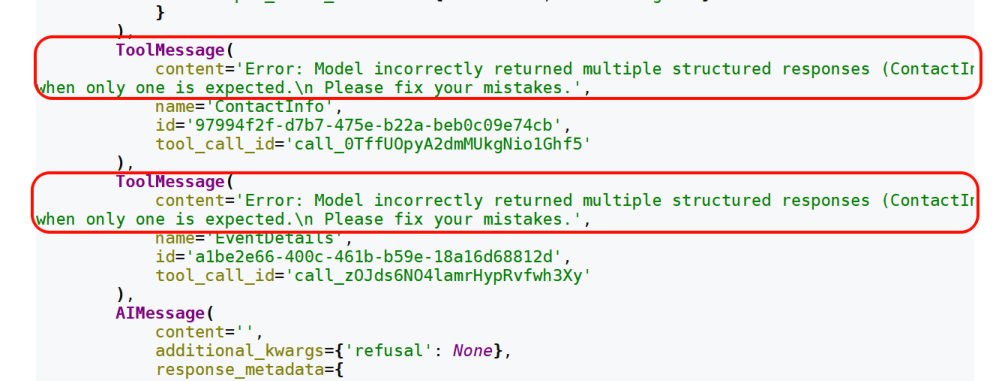 图:
图:handle_errors=True 时的真实消息流——模型一次发了两个结构化结果,系统回给它两条带内置错误模板的 ToolMessage("Error: Model incorrectly returned multiple structured responses … Please fix your mistakes."),模型据此重试
这种情况下:
- 用
Union[ContactInfo, EventDetails]指定多个类型时,最终只会转换成一种结构化类型输出 - 内部生成结构化类型的工具会报错,此时
handle_errors=True(默认)开始发挥作用:系统生成一条 ToolMessage,明确告诉模型Error: Model incorrectly returned multiple structured responses (ContactInfo, EventDetails) when only one is expected.模型收到这个精准反馈后会重新推理,最终选一个最符合要求的 Schema - 如果
handle_errors=False,程序直接报错
常见的两个异常类型:MultipleStructuredOutputsError(输出多个结构化结果)、StructuredOutputValidationError(结果不符合 Schema)。
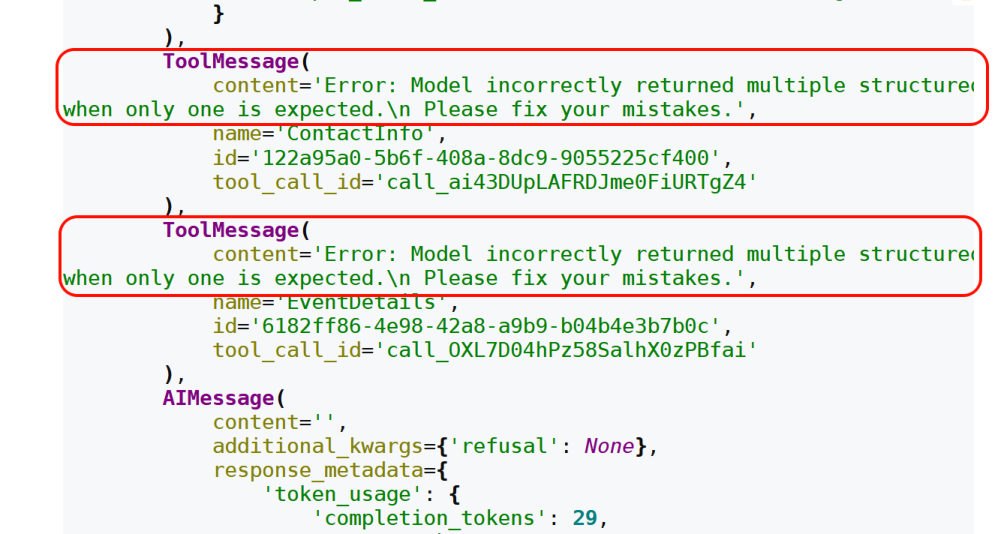 图:
图:handle_errors=(MultipleStructuredOutputsError, StructuredOutputValidationError) 时——异常被捕获(程序没中断),回给模型的仍是内置错误模板,模型重新推理
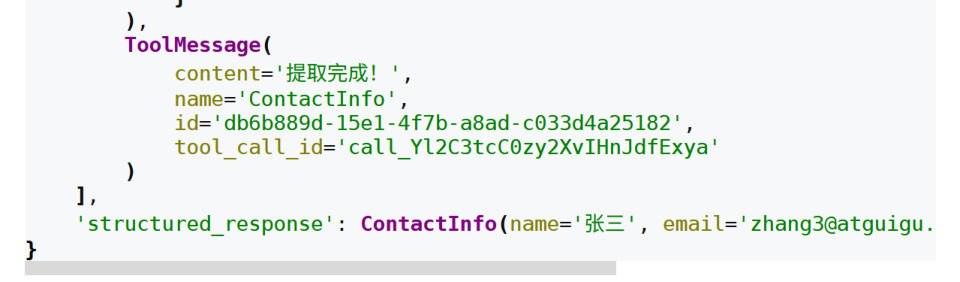 图:重试成功后——ToolMessage 的 content 变成了自定义的"提取完成!",
structured_response 里正常拿到 ContactInfo(name='张三', …)
WARNING
格式化输出出错时,Agent 内部会反复重试直到输出符合要求——可能要重试多次。这意味着错误处理是有成本的(额外的模型调用)。
 图:
图:handle_errors=custom_error_handler 时,自定义处理函数里打印出的异常类型与详情(这里捕获到的是 MultipleStructuredOutputsError)
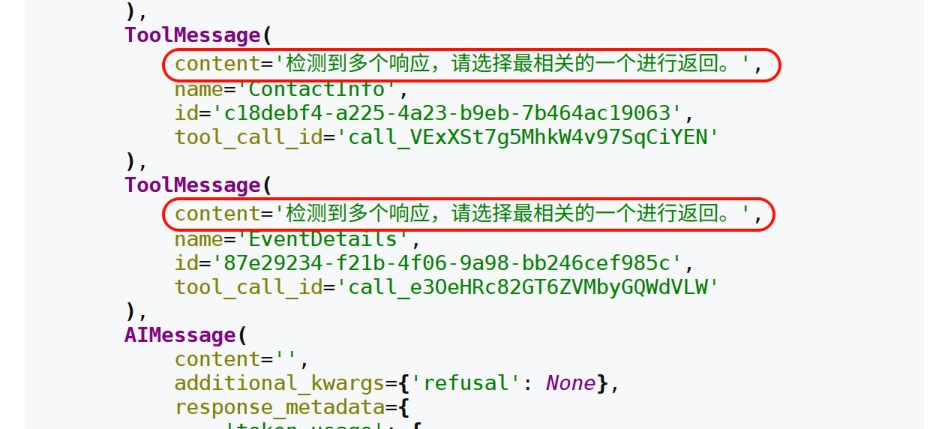 图:自定义处理函数的返回值被直接当作 ToolMessage 的内容回给模型——"检测到多个响应,请选择最相关的一个进行返回。"
四种 Schema 的完整案例
课程在 schema 参数这一节走了四种写法,并统一用一个综合案例(客户分析报告)演示。先看准备工作,再逐个写法。
准备:两个模型供应商(因为支持力度不同)
课程原话:不同的 Schema 在不同模型供应商下表现的支持力度不同(上一章有说明),所以提供了两套模型,大家自己选。
# 供应商一:CloseAI 平台(OpenAI 兼容,课程默认用这套)
from langchain.chat_models import init_chat_model
from dotenv import load_dotenv
import os

load_dotenv(override=True)

model = init_chat_model(
    model="gpt-5.4-mini",
    model_provider="openai",
    api_key=os.getenv("CLOSEAI_API_KEY"),
    base_url=os.getenv("CLOSEAI_BASE_URL"),
)# 供应商二:OpenRouter 平台(需要梯子)
from langchain_openrouter import ChatOpenRouter
from dotenv import load_dotenv
import os
load_dotenv(override=True)
model = ChatOpenRouter(
model="openai/gpt-5.4-mini", # ← 用「供应商/模型名」的写法
api_key=os.getenv("OPENROUTER_API_KEY"),
base_url=os.getenv("OPENROUTER_API_BASE"),
)NOTE
ChatOpenRouter 来自第三方包 langchain-openrouter(本机环境里已装 0.1.0),用法与别的 Chat 模型一致:一样能塞进 create_agent(model=...)、一样能配 ToolStrategy。 实测(把自己的假服务端当 OpenRouter 端点):ChatOpenRouter(model="openai/gpt-5.4-mini", api_key="sk-fake", base_url="http://127.0.0.1:8774") 能正常发出请求(请求体里的 model 字段就是 openai/gpt-5.4-mini),配 ToolStrategy(ContactInfo) 也能拿到 name='小明' email='a@b.com' phone='123'。 只是本机没有 OpenRouter 的真密钥,所以下面的例子依旧沿用本机的 DeepSeek 模型——代码结构完全一样,只换 model 那一段。
写法1:Pydantic —— 客户分析报告(完整综合案例)
这是本节的"主案例":Agent 不只输出结构化结果,还要先查数据库、VIP 才发邮件,最后交一份报告。它把"工具调用"和"结构化输出"放在了同一次任务里。
from langchain_core.messages import SystemMessage
from pydantic import BaseModel, Field
from typing import Literal
from langchain.agents import create_agent
from langchain.agents.structured_output import ToolStrategy
from langchain.tools import tool

# ---------- 1. 两个"真"工具 ----------
@tool(parse_docstring=True)
def search_customer_database(query: str) -> str:
    """在客户数据库中搜索信息

    Args:
        query (str): 客户查询字符串,例如 "张三" 或 "李四"

    Returns:
        str: 客户记录字符串,包含客户姓名、等级、最近购买日期和累计消费
    """
    # 模拟数据库查询结果
    if "张三" in query.lower():
        return "客户记录:张三,VIP客户,最近购买日期:2026-01-15,累计消费:$15,000"
    elif "李四" in query.lower():
        return "客户记录:李四,普通客户,最近购买日期:2025-12-20,累计消费:$3,200"
    else:
        return f"关于客户{query},无记录"


@tool(parse_docstring=True)
def send_email(customer: str) -> str:
    """发送感谢邮件

    Args:
        customer (str): 客户名称,例如 "张三" 或 "李四"

    Returns:
        str: 确认消息,包含已发送的客户名称
    """
    return f"已向 {customer} 发送感谢邮件"


# ---------- 2. 定义 Pydantic Schema ----------
class CustomerAnalysis(BaseModel):
    """客户分析报告"""
    customer_name: str = Field(None, description="客户姓名")
    customer_tier: Literal["潜在客户", "普通客户", "VIP客户", "流失风险"] = Field(
        "潜在客户", description="客户等级,只能是潜在客户、普通客户、VIP客户或流失风险"
    )
    recent_activity: str = Field(None, description="最近活动")
    spending_level: Literal["低", "中", "高"] = Field(None, description="消费水平")
    send_email: bool = Field(False, description="是否已发送感谢邮件")


# ---------- 3. 创建智能体 ----------
agent = create_agent(
    model=model,
    system_prompt=SystemMessage(content=""
        "请分析指定客户的情况:"
        "1. 先搜索客户数据库了解最新情况 "
        "2. 如果是VIP客户,则发送感谢邮件 "
        "3. 基于搜索结果生成结构化分析报告 "
        "4. 如果用户提问与客户记录无关或找不到客户信息,则返回空对象,不发送感谢邮件"
    ),
    tools=[search_customer_database, send_email],     # 工具 + 结构化输出同时用
    response_format=ToolStrategy(CustomerAnalysis),
)

# ---------- 4. 执行分析 ----------
result = agent.invoke({
    "messages": [{"role": "user", "content": "请分析客户张三"}]
    # "messages": [{"role": "user", "content": "请分析客户李四"}]
    # "messages": [{"role": "user", "content": "请分析客户王五"}]
    # "messages": [{"role": "user", "content": "今天天气如何"}]
})

# ---------- 5. 处理结果 ----------
if "structured_response" in result:
    analysis = result["structured_response"]
    print(analysis)
输出:
customer_name='张三' customer_tier='VIP客户' recent_activity='最近购买日期:2026-01-15' spending_level='高' send_email=True| 写法 | 为什么这么写 |
|---|---|
枚举字段用 Literal["潜在客户", "普通客户", "VIP客户", "流失风险"] | 把取值锁死在几个选项里,模型不会自创"金牌客户""白金会员"这类值 |
字段都给默认值(Field("潜在客户", ...) / Field(False, ...)) | 信息缺失时有兜底,不至于因为一个空字段整份报告校验失败 |
send_email: bool 字段 | 它是一个状态标记:"这封感谢邮件到底发没发",和同名工具配合使用 |
| 系统提示词的四条指令 | 把"先查库 → VIP 才发邮件 → 再出报告 → 查不到就返回空对象"的顺序讲清楚,第 4 条尤其关键——没有它,模型会反反复复地查一个不存在的客户 |
最后用 if "structured_response" in result 取值 | 不是每次调用都一定有结构化结果,先判断再取,避免 KeyError |
NOTE
实测这个案例能跑通(用假服务端扮演模型,按"查库 → 发邮件 → 出报告"三步返回工具调用):
消息类型链: HumanMessage → AIMessage → ToolMessage → AIMessage → ToolMessage → AIMessage → ToolMessage
structured_response: customer_name='张三' customer_tier='VIP客户' recent_activity='最近购买日期:2026-01-15' spending_level='高' send_email=True
类型: CustomerAnalysis
两个观察:
- 消息链里两个真工具先跑(各一对 AI/Tool),结构化输出排在最后——整条链的第 7 条(最后那条
ToolMessage)就是伪消息,它的name='CustomerAnalysis'。这正是"任务结束才解析结构化输出"的直观体现。 structured_response是CustomerAnalysis对象(不是 dict),可以直接analysis.customer_tier这样取值。
写法2:TypedDict
字段的写法是 Annotated[类型, 默认值, "描述"],可选字段用 Optional 包装——三条要点在本篇「参数1」里已经列过,这里只补一句:同样的客户分析案例,把 class CustomerAnalysis(BaseModel) 换成 class CustomerAnalysis(TypedDict) 就能跑,但因为它不做运行时校验,字段写错只会悄悄出错。
写法3:手写 JSON Schema 字典
不定义类,直接给一个符合 JSON Schema 规范的字典——适合需要与多种编程语言/系统交换结构定义的场景。
# 把所有字段定义成一个标准 JSON Schema 字典(替代上面的 Pydantic 模型)
customer_analysis_schema = {
    "title": "CustomerAnalysis",           # 结构名(会当"虚拟工具"的名字用)
    "type": "object",                      # 表示"这是一个对象"
    "description": "客户分析报告",
    "properties": {                        # 每个字段的定义
        "customer_name": {
            "type": "string",
            "default": "",
            "description": "客户姓名",
        },
        "customer_tier": {
            "type": "string",
            "enum": ["潜在客户", "普通客户", "VIP客户", "流失风险"],   # ← 枚举写在这里
            "default": "潜在客户",
            "description": "客户等级",
        },
        "recent_activity": {
            "type": "string",
            "default": "",
            "description": "最近活动",
        },
        "spending_level": {
            "type": "string",
            "enum": ["低", "中", "高"],
            "default": "低",
            "description": "消费水平",
        },
        "send_email": {
            "type": "boolean",             # ← 布尔类型(注意 JSON 里写 false)
            "default": False,
            "description": "是否已发送感谢邮件",
        },
    },
    # 所有字段都是必须输出的
    "required": ["customer_name", "customer_tier", "recent_activity", "spending_level"],
}

agent = create_agent(
    model=model,
    system_prompt=SystemMessage(content="...同写法1的四条指令..."),
    tools=[search_customer_database, send_email],
    response_format=ToolStrategy(customer_analysis_schema),   # ← 直接把字典交给 ToolStrategy
)| 关键字 | 作用 |
|---|---|
title | 结构名,会作为"虚拟工具"名 |
type | 结构类型,对象写 "object" |
description | 结构/字段的说明文字(模型读它) |
properties | 字段字典:每个字段写 type、description,可选 enum、default |
enum | 枚举可选值(如客户等级、消费水平) |
default | 默认值 |
required | 必须输出的字段名列表 |
TIP
课程原话:title, description, type, properties, required 都是遵循 JSON Schema 规范的标准关键字,是固定写法(细节在第 06 章 2.3 节,也就是本笔记讲模型结构化输出的 11/12 篇)。 实测补充:用手写字典做 Schema 时,result["structured_response"] 拿到的是普通 dict({'name': '小明', 'email': ..., 'phone': ...}),不是 Pydantic 对象——想要对象属性和自动校验,还是用 Pydantic 类。
写法4:@dataclass
@dataclass 是 Python 3.7 引入的装饰器,用来简化"只存数据"的类定义:
from dataclasses import dataclass
from langchain.agents import create_agent
from langchain.agents.structured_output import ToolStrategy
from langchain.messages import HumanMessage
from pydantic import Field              # ← 课程举例1 的片段里没写这一行,得自己补

@dataclass
class ContactInfo:
    """用户的联系方式"""
    name: str = Field(description="用户姓名")
    email: str = Field(description="用户邮箱地址")
    phone: str = Field(description="用户手机号")

agent = create_agent(
    model=model,
    response_format=ToolStrategy(ContactInfo),
)

response = agent.invoke({
    "messages": [
        HumanMessage("从这段话中抽取结构化信息:小明的邮箱地址为:songhk@atguigu.com,手机号:12345678912")
    ]
})

for msg in response["messages"]:
    msg.pretty_print()
输出里那条伪 ToolMessage 的正文是数据类的表示形式(注意和 Pydantic 的 name='小明' 写法不同):
================================== Ai Message ==================================
Tool Calls:
  ContactInfo (call_3MRoBpJHDaoYB6jK7plgW1YF)
 Call ID: call_3MRoBpJHDaoYB6jK7plgW1YF
  Args:
    name: 小明
    email: songhk@atguigu.com
    phone: 12345678912
================================= Tool Message =================================
Name: ContactInfo

Returning structured response: ContactInfo(name='小明', email='songhk@atguigu.com', phone='12345678912')
WARNING
@dataclass 这个写法有坑,**实测(langchain 1.2.12)**如下:
- 字段写的
Field(description=...)是 Pydantic 的Field,必须from pydantic import Field;课程举例1 的代码片段里没有这行 import,单独复制会直接NameError。 - 用
Field(...)当默认值时,dataclasses.fields(ContactInfo)里每个字段的default是一个FieldInfo对象(不是"无默认值")——所以ContactInfo()直接构造出来的字段值会是一堆FieldInfo。 - 好消息是走 Agent 时没问题:实测发给模型的工具定义里 description 正常带上、
result["structured_response"]也正确返回了ContactInfo(...)实例。 - 不写
Field、纯@dataclass(name: str这样)也能跑通,只是字段没有 description(模型少了一部分信息)。
结论:想要描述信息 + 强校验,用 Pydantic BaseModel;只是想少写点样板代码,@dataclass 也能用,但别指望它做校验。
写 Agent 结构化输出时的四个注意点
课程踩坑总结,值得贴在手边:
- 结构化输出的要求写在系统提示词的最后。如果提示词里"先"要求输出结构化结果(Agent 以为任务已完成),可能会导致一些工具不再被调用。
- 系统提示词里要最后加上"未找到用户"时的处理提示,避免程序一直调用工具反复查找不存在的用户信息(死循环)。
- TypedDict 那三条(
Annotated[类型, 默认值, "描述"]/Optional包装可选字段 / 不支持运行时验证)。 Union多类型最终只输出一种;靠handle_errors兜底重试。
相关
练习题
一、知识回顾(读完直接做下面的实践题)
- 模型的结构化输出绑在大模型(模型对象)上(方法名
with_structured_output),Agent 的结构化输出写在create_agent的response_format参数里;解析时机也不同——模型是每次模型调用都解析,Agent 只在它决定"任务结束"、输出最终答案时才解析,所以结构化结果总是排在消息链的最后;适用场景也不同:模型适合单次、确定性的任务(提取字段、翻译、分类),Agent 适合多步、复杂推理的任务(查文档后汇总报表) - 四种策略:ProviderStrategy 只走模型厂商的原生能力(请求体里多出一个
response_format字段、内容是json_schema,而且tools是空的),所以只适用于支持原生结构化输出的模型(OpenAI / Claude / Grok 等);ToolStrategy 把 Schema 当成一个"工具"传给模型(官方推荐、兼容性最好,适用于任何支持工具调用的模型);直接传类型会被自动包装成 AutoStrategy;None(默认)表示不做结构化输出(自然语言回答)。建议:新代码一律显式写策略 - 结构化结果存在 Agent 状态的
structured_response键里,取之前先写if "structured_response" in result,避免 KeyError;ToolStrategy 还会在消息列表末尾追加一条伪(假的)的 ToolMessage(实际没有执行任何工具),它的name就是 Schema 类名(如ContactInfo),返回字典的两个键是messages和structured_response - ToolStrategy 三个参数:
schema(必需,支持 Pydantic、TypedDict、JSON Schema 字典、@dataclass四类,还支持联合类型Union[...]——此时最终只会转换成一种结构)、tool_message_content(自定义伪消息内容,让对话更自然 / 少占 token,但不影响结构化结果)、handle_errors(校验失败怎么办,默认True) handle_errors的五种取值:True用内置错误消息模板提示模型重试;False关闭重试、异常直接抛出(中断程序);字符串则把这句话当错误消息回给模型;传异常类型只重试指定类型的异常;传 callable 用自定义函数处理。最典型的错误是"多结构化输出"错误,两个常见异常是MultipleStructuredOutputsError和StructuredOutputValidationError- TypedDict 当 Schema 的三条要点:字段写成
Annotated[类型, 默认值, "描述"]格式;可选字段用Optional包装;不支持运行时校验(写错只会悄悄出错) - 手写 JSON Schema 字典的标准关键字:
title(结构名,会当作"虚拟工具"的名字)、type、description、properties(字段字典)、enum(枚举可选值)、default、required(必须输出的字段名列表);用这种写法拿到的structured_response是普通字典(dict),不是 Pydantic 对象 @dataclass写法:字段描述用的是 pydantic 的Field(课程代码片段里缺这行 import,单独复制会NameError);Field(...)当默认值时,字段的default是FieldInfo对象;不写Field也能跑通,只是字段没有 description(模型少了一部分信息)- 客户分析案例的三个技巧:枚举字段用
Literal[...]把取值锁死、所有字段都给默认值兜底、send_email: bool充当"邮件发没发"的状态标记;系统提示词的最后一条必须写"查不到客户就返回空对象(不发送感谢邮件)",否则模型会反复查一个不存在的客户。另外,结构化输出的要求要写在系统提示词的最后,写在前面可能让部分工具不再被调用 - 两个模型供应商:供应商一用
init_chat_model(..., model_provider="openai")走 OpenAI 兼容;供应商二用第三方包langchain-openrouter的ChatOpenRouter,模型名要写成"供应商/模型名"的格式。源码里ResponseFormat把三种策略写成**平级(|联合)**关系,AutoStrategy(Schema)与"直接传类型(response_format=Schema)"等价
二、裸写题
- 提示(先自己想,实在想不出再点开)
一级 · 思路:Schema 写在数据模型类里;"什么时候解析"由 Agent 的交付格式参数决定——用官方推荐的那种(靠工具调用实现的) 二级 · 方法:
from langchain.agents.structured_output import ToolStrategy;create_agent(model=..., response_format=ToolStrategy(ContactInfo))三级 · 骨架:先if "structured_response" in response:再打印,否则可能KeyError;顺便print(type(...)),确认拿到的是对象还是字典- 提示(先自己想,实在想不出再点开)
一级 · 思路:那条消息是为了"补链路"(模型发了工具调用,总得有个响应),实际没执行任何工具;它的内容可以自定义,但只影响对话历史里的那一条记录 二级 · 方法:
type(msg).__name__+getattr(msg, "name", None);ToolStrategy(ContactInfo, tool_message_content="提取完成!")(ToolMessage就是那条伪消息的类型) 三级 · 骨架:改完再打印response2["messages"][-1].content对比;顺便想想自定义伪消息的两个用途(用户看到的对话更自然、少占 token)- 提示(先自己想,实在想不出再点开)
一级 · 思路:枚举字段要"锁死"取值(不然模型会自创"金牌客户"这种值);
send_email是"邮件发没发"的状态标记、和同名工具配合;取值前先判断有没有结构化结果 二级 · 方法:Literal["潜在客户", "普通客户", "VIP客户", "流失风险"]、Field(默认值, description=...);create_agent(model=..., system_prompt=SystemMessage(content=...), tools=[...], response_format=ToolStrategy(CustomerAnalysis))三级 · 骨架:预期消息链是 人 → AI → 工具 → AI → 工具 → AI → 工具(第 7 条就是伪消息);想验证"VIP 才发邮件",把输入换成"请分析客户李四"再跑一次,看还会不会调发邮件工具- 提示(先自己想,实在想不出再点开)
一级 · 思路:三种写法在"校验"和"结果类型"上差别很大——课程反复强调"想要强校验就用 Pydantic" 二级 · 方法:
ToolStrategy(字典);TypedDict+Annotated[类型, "描述"];@dataclass+from pydantic import Field三级 · 骨架:① 工具名就是字典的title(或类名)——想看清"工具名从哪来",可以把三种写法的结构名取得不一样;想确认"说明有没有传给模型",去翻请求体里tools[0].function.parameters;③ 记得from pydantic import Field,否则NameError,另外打印一下dataclasses.fields(类)的default,会看到意外的东西
三、综合题
- 提示(先自己想,实在想不出再点开)
一级 · 思路:联合类型让模型"选一个";出错重试策略决定"选错 / 一次选了多个"时怎么办 二级 · 方法:
ToolStrategy(Union[ContactInfo, EventDetails], tool_message_content="提取完成!", handle_errors=True)三级 · 骨架:最典型的错误是"多结构化输出"——模型一次发了两个工具调用;默认重试时消息里会出现 LangChain 内置模板Error: Model incorrectly returned multiple structured responses (ContactInfo, EventDetails) when only one is expected.,关闭重试时直接抛MultipleStructuredOutputsError;想知道自定义处理函数收到哪个异常,在函数里print(type(e).__name__)
- 参考答案(做完再点开)
import os
from dataclasses import dataclass, fields as dataclass_fields
from typing import Annotated, Literal, Optional, TypedDict, Union

from dotenv import load_dotenv
from langchain.agents import create_agent
from langchain.agents.structured_output import ToolStrategy
from langchain.chat_models import init_chat_model
from langchain.messages import HumanMessage
from langchain.tools import tool
from langchain_core.messages import SystemMessage
from pydantic import BaseModel, Field

load_dotenv(override=True)

model = init_chat_model(
    model="deepseek-v4-flash",
    model_provider="openai",
    api_key=os.getenv("DEEPSEEK_API_KEY"),
    base_url=os.getenv("DEEPSEEK_BASE_URL"),
)

# ---------- 2-1 最简 ToolStrategy ----------
class ContactInfo(BaseModel):
    """个人联系信息"""
    name: str = Field(description="姓名")
    email: str = Field(description="电子邮箱")
    phone: str = Field(description="手机号")

agent = create_agent(model=model, response_format=ToolStrategy(ContactInfo))
question = HumanMessage("从这段话中抽取结构化信息:小明的邮箱地址为:songhk@atguigu.com,手机号:12345678912")
response = agent.invoke({"messages": [question]})
if "structured_response" in response:
    print(response["structured_response"])          # name='小明' email='songhk@atguigu.com' phone='12345678912'
    print(type(response["structured_response"]))    # <class '__main__.ContactInfo'>

# ---------- 2-2 伪 ToolMessage + 自定义内容 ----------
for msg in response["messages"]:
    print(type(msg).__name__, "| name =", getattr(msg, "name", None), "| content =", str(msg.content)[:60])
# HumanMessage | name = None | content = 从这段话中抽取结构化信息:…
# AIMessage    | name = None | content =                     ← 发起工具调用,工具名就是 Schema 类名
# ToolMessage  | name = 'ContactInfo' | content = Returning structured response: name='小明' …

agent2 = create_agent(model=model, response_format=ToolStrategy(ContactInfo, tool_message_content="提取完成!"))
response2 = agent2.invoke({"messages": [question]})
print(response2["messages"][-1].content)      # 提取完成!
print(response2["structured_response"])       # 结构化结果照样正确

# ---------- 2-3 客户分析报告(工具 + 结构化) ----------
@tool(parse_docstring=True)
def search_customer_database(query: str) -> str:
    """在客户数据库中搜索信息

    Args:
        query (str): 客户查询字符串,例如 "张三" 或 "李四"

    Returns:
        str: 客户记录字符串,包含客户姓名、等级、最近购买日期和累计消费
    """
    if "张三" in query.lower():
        return "客户记录:张三,VIP客户,最近购买日期:2026-01-15,累计消费:$15,000"
    elif "李四" in query.lower():
        return "客户记录:李四,普通客户,最近购买日期:2025-12-20,累计消费:$3,200"
    return f"关于客户{query},无记录"

@tool(parse_docstring=True)
def send_email(customer: str) -> str:
    """发送感谢邮件

    Args:
        customer (str): 客户名称,例如 "张三" 或 "李四"

    Returns:
        str: 确认消息,包含已发送的客户名称
    """
    return f"已向 {customer} 发送感谢邮件"

class CustomerAnalysis(BaseModel):
    """客户分析报告"""
    customer_name: str = Field(None, description="客户姓名")
    customer_tier: Literal["潜在客户", "普通客户", "VIP客户", "流失风险"] = Field(
        "潜在客户", description="客户等级,只能是潜在客户、普通客户、VIP客户或流失风险"
    )
    recent_activity: str = Field(None, description="最近活动")
    spending_level: Literal["低", "中", "高"] = Field(None, description="消费水平")
    send_email: bool = Field(False, description="是否已发送感谢邮件")

agent3 = create_agent(
    model=model,
    system_prompt=SystemMessage(content=""
        "请分析指定客户的情况:"
        "1. 先搜索客户数据库了解最新情况 "
        "2. 如果是VIP客户,则发送感谢邮件 "
        "3. 基于搜索结果生成结构化分析报告 "
        "4. 如果用户提问与客户记录无关或找不到客户信息,则返回空对象,不发送感谢邮件"),
    tools=[search_customer_database, send_email],
    response_format=ToolStrategy(CustomerAnalysis),
)
result = agent3.invoke({"messages": [{"role": "user", "content": "请分析客户张三"}]})
print("消息类型链:", " → ".join(type(m).__name__ for m in result["messages"]))
# HumanMessage → AIMessage → ToolMessage → AIMessage → ToolMessage → AIMessage → ToolMessage
print([m.name for m in result["messages"] if type(m).__name__ == "ToolMessage"][-1])   # CustomerAnalysis
if "structured_response" in result:
    print(result["structured_response"])
    # customer_name='张三' customer_tier='VIP客户' recent_activity='最近购买日期:2026-01-15' spending_level='高' send_email=True
    print(result["structured_response"].customer_tier)                                  # 对象属性取值:VIP客户

# ---------- 2-4 同一份 Schema 的三种写法 ----------
# ① 手写 JSON Schema 字典
contact_schema = {
    "title": "ContactInfo",              # 结构名 = 虚拟工具名
    "type": "object",
    "description": "个人联系信息",
    "properties": {
        "name": {"type": "string", "default": "", "description": "姓名"},
        "email": {"type": "string", "default": "", "description": "电子邮箱"},
        "phone": {"type": "string", "default": "", "description": "手机号(可省略)"},
    },
    "required": ["name", "email"],       # 只要求前两个
}
agent4 = create_agent(model=model, response_format=ToolStrategy(contact_schema))
r4 = agent4.invoke({"messages": [question]})
print(type(r4["structured_response"]).__name__)        # dict ← 普通字典,没有属性访问

# ② TypedDict(Annotated[类型, 描述];可选字段用 Optional)
class ContactInfoTD(TypedDict):
    """个人联系信息"""
    name: Annotated[str, "姓名"]
    email: Annotated[str, "电子邮箱"]
    phone: Annotated[Optional[str], "手机号"]

agent5 = create_agent(model=model, response_format=ToolStrategy(ContactInfoTD))
r5 = agent5.invoke({"messages": [question]})
print(type(r5["structured_response"]).__name__)        # dict ← 同样不做运行时校验

# ③ @dataclass(注意 Field 来自 pydantic)
@dataclass
class ContactInfoDC:
    """用户的联系方式"""
    name: str = Field(description="用户姓名")
    email: str = Field(description="用户邮箱地址")
    phone: str = Field(description="用户手机号")

agent6 = create_agent(model=model, response_format=ToolStrategy(ContactInfoDC))
r6 = agent6.invoke({"messages": [question]})
print(type(r6["structured_response"]))                 # <class '__main__.ContactInfoDC'> ← 是对象
print([f.default for f in dataclass_fields(ContactInfoDC)][0])
# FieldInfo(annotation=NoneType, required=True, description='用户姓名') ← 坑:default 被 Field 占了

# ---------- 3-1 Union 多类型 + handle_errors ----------
class EventDetails(BaseModel):
    """活动详情"""
    event_name: str = Field(description="活动名称")
    date: str = Field(description="活动日期")

agent7 = create_agent(
    model=model,
    response_format=ToolStrategy(Union[ContactInfo, EventDetails], tool_message_content="提取完成!"),
)
for text in [
    "从这段话中抽取结构化信息:小明的邮箱地址为:songhk@atguigu.com,手机号:12345678912",
    "从这段话中抽取结构化信息:2026年高考报名人数突破1200万",
]:
    r = agent7.invoke({"messages": [HumanMessage(text)]})
    if "structured_response" in r:
        print(type(r["structured_response"]).__name__, r["structured_response"])
# ContactInfo name='小明' email='songhk@atguigu.com' phone='12345678912'
# EventDetails event_name='2026年高考报名人数突破1200万' date='…'

# 把 handle_errors 换成 False / "请检查输入数据" 再跑一次,对比失败时的表现:
agent8 = create_agent(
    model=model,
    response_format=ToolStrategy(
        Union[ContactInfo, EventDetails],
        tool_message_content="提取完成!",
        handle_errors=True,        # 改 False:直接抛 MultipleStructuredOutputsError;改字符串:当作错误提示回传
    ),
)
r8 = agent8.invoke({"messages": [HumanMessage("从这段话中抽取结构化信息:小明的邮箱地址为:songhk@atguigu.com,手机号:12345678912")]})
for m in r8["messages"]:
    if type(m).__name__ == "ToolMessage":
        print(m.name, "->", str(m.content)[:110])
# 触发"多结构化输出"错误时(模型一次返回两个结构化结果):
#   ContactInfo  -> Error: Model incorrectly returned multiple structured responses (ContactInfo, EventDetails) …
#   EventDetails -> Error: Model incorrectly returned multiple structured responses (ContactInfo, EventDetails) …
#   ContactInfo  -> 提取完成!        ← 重试成功,用的还是自定义的伪消息内容